

Keyword Effectiveness Index (KEI)
Table of Content:
- What is Keyword Effectiveness Index (KEI)?
- Keyword Effectiveness Index formula
- How to interpret KEI scores
- KEI vs. other ASO keyword metrics
- How to use KEI in app store keyword research
- Common mistakes when using KEI
- How AppFollow calculates and reports KEI
- Frequently asked questions
- Related glossary terms
The Keyword Effectiveness Index (KEI) is a score that ranks how worthwhile a keyword is to target. It weighs how often a keyword is searched against how much competition it faces, so a higher KEI means stronger opportunity. In App Store Optimization (ASO), KEI helps marketers prioritize which app keywords to fight for in title, subtitle and keyword fields.
What is Keyword Effectiveness Index (KEI)?
Keyword Effectiveness Index (KEI) is a numerical score that estimates a keyword's opportunity by combining search volume and competition into a single value.
The metric was introduced by SEO researcher Sumantra Roy in 1997 to help web publishers choose keywords with high demand and low supply. Today, ASO tools like AppFollow report a KEI-style score for app keywords across the iOS App Store and Google Play, so app marketers can apply the same logic to mobile discovery.
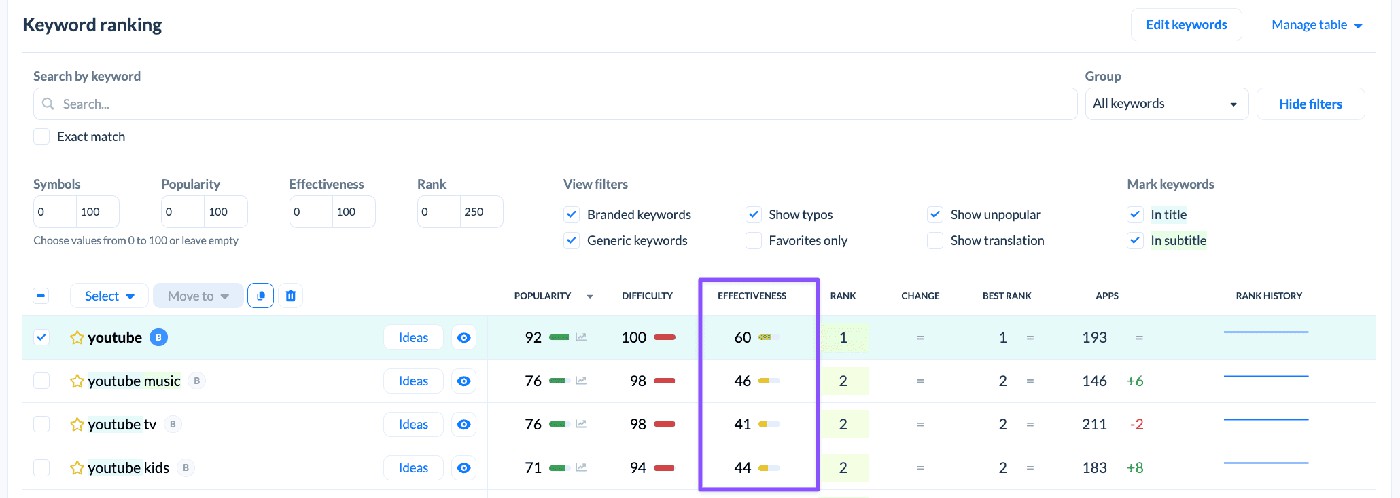
In an ASO context, KEI sits alongside keyword volume, keyword difficulty and chance score as one of the core signals app publishers use during keyword research.
Keyword Effectiveness Index formula
The keyword effectiveness index formula divides the square of search volume by the level of competition. Squaring the volume amplifies the value of high-demand keywords; dividing by competition penalizes oversaturated ones. The result is a single score that's easy to sort and prioritize on.
The original KEI formula
Sumantra Roy's original formula is:
KEI = (Search Volume)² ÷ Number of Competing Pages
Search volume is the number of monthly searches for the keyword. Competing pages is the count of results returned for the query — the lower it is, the easier the keyword is to win.
How the KEI formula is adapted for ASO
App stores don't expose absolute search volume the way Google does, so ASO tools approximate KEI using a normalized 0–100 score that blends two inputs: a popularity signal (often derived from Apple Search Ads popularity or modeled Google Play traffic) and a difficulty signal (how hard it is to rank in the top 10 for that keyword in that storefront).
Each vendor calculates it slightly differently, so always check the methodology before comparing KEI between tools.
Example: calculating KEI for an app keyword
Say the keyword "meditation app" has a relative popularity of 55 and a difficulty score of 40 on the US iOS App Store.
Using a simple ASO-style
KEI = popularity² ÷ difficulty, you get 55² ÷ 40 = 3,025 ÷ 40 ≈ 75.6
Compared to "sleep meditation" with popularity 35 and difficulty 18 (KEI ≈ 68), "meditation app" is the slightly stronger bet — but only if your app is relevant to that broader query.
How to interpret KEI scores
There is no universal KEI cutoff: scoring scales depend on whether you're using the original Roy formula (open-ended numeric) or a tool-specific normalized index (usually 0–100). What matters is consistent comparison within the same tool and the same storefront.
KEI score ranges and what they mean
For the original SEO-style formula, common thresholds are:
- under 25 = low opportunity,
- 25–100 = moderate,
- 100–400 = strong,
- 400 and up = excellent.
ASO tools that use a 0–100 scale typically treat
- 0–20 as low,
- 20–40 as moderate,
- 40–70 as strong
- and 70+ as excellent
but always read your vendor's own ranges, since a "high" KEI in one tool can be "average" in another.
Why a high KEI doesn't always mean a good keyword
A high KEI only means math-favorable opportunity. It does not guarantee relevance to your app, purchase intent, or installs.
A meditation app chasing a high-KEI keyword like "free music" will rank for traffic that doesn't convert. Always pair KEI with a qualitative check: would a user searching this term actually want my app?
KEI vs. other ASO keyword metrics
KEI is a composite score. Most ASO teams use it alongside — not instead of — the underlying metrics. Here's how the four most common signals relate to each other.
Metric |
What it measures |
Scale |
When to use it |
Keyword volume |
How often a keyword is searched in a storefront |
Relative (0–100) or absolute estimate |
Sizing demand for a single keyword |
Keyword difficulty |
How hard it is to rank in the top 10 for that keyword |
0–100 |
Reality-checking whether you can compete |
KEI |
Volume vs. competition trade-off, in one score |
Open numeric (original) or 0–100 (ASO tools) |
Sorting a keyword list by opportunity |
Chance Score |
Probability your specific app ranks for a keyword |
0–100, app-specific |
Final prioritization once metadata is set |
KEI vs. keyword difficulty
Keyword difficulty answers "can I rank?" — KEI answers "is ranking worth it?". A keyword can have low difficulty and still have a low KEI if almost nobody searches for it. Use difficulty as a filter and KEI as a ranker.
KEI vs. keyword volume
Keyword volume is one input into KEI. A keyword with high volume but brutal competition can still have a low KEI; a long-tail keyword with modest volume but almost no competition can score surprisingly high. KEI is what stops you from chasing only headline volume.
KEI vs. Chance Score and other proprietary indices
Chance Score (and similar vendor-specific indices) factors in your app — its current ranking, metadata weight and recent performance — to estimate the probability you, specifically, can rank for a keyword. KEI is app-agnostic; chance score is app-specific. Use KEI to build the shortlist, chance score to commit.
How to use KEI in app store keyword research
KEI earns its keep when it's part of a repeatable workflow, not a one-off lookup. A standard ASO process looks like this:
- Build a seed keyword list — pull suggestions from competitor apps, App Store autocomplete, search ads campaigns and your own description.
- Pull KEI for each keyword in your target storefront and locale. Don't mix US and UK data on one list.
- Prioritize by KEI tier and filter for relevance — drop any high-KEI keywords your app can't honestly serve.
- Monitor KEI over time. Volume, difficulty and competition all shift, especially after platform updates or seasonal spikes; re-rank every 2–4 weeks.
Common mistakes when using KEI
- Treating KEI as the only signal. KEI doesn't see your app. Two apps with identical metadata can have wildly different actual ranking outcomes for the same KEI-favorable keyword. Always pair KEI with chance score and conversion data.
- Ignoring intent and relevance. If users searching the keyword don't want what your app does, KEI is noise. The cleanest signal — but the easiest to ignore — is whether the keyword matches a real user need your app serves.
- Not localizing KEI by storefront. A keyword that scores high in the US App Store can be irrelevant in DE or JP because of different volumes, different competitors and different language patterns. Pull KEI per locale, not globally.
How AppFollow calculates and reports KEI
AppFollow's Keyword Research module reports a KEI-style opportunity score for every keyword in every supported storefront and locale.
The score combines popularity (sourced from Apple Search Ads where available, modeled for Google Play), the number and strength of competing apps in the top 10, and recent ranking volatility. Each keyword also shows raw search volume, difficulty and chance score, so teams can audit how the composite number was built — no black box.
ASO teams typically use AppFollow to track 50–500 keywords across multiple countries on a single dashboard, then re-run prioritization on a weekly cadence. [INSERT SCREENSHOT — alt: "AppFollow Keyword Research view showing KEI, difficulty and chance score for app keywords"]

Frequently asked questions
What is a good keyword effectiveness index score?
A "good" KEI depends on the formula your tool uses. On the original Roy scale, anything over 100 is considered strong and over 400 is excellent. On a normalized 0–100 ASO scale, 40+ is generally strong and 70+ is excellent. The most important rule is to compare KEI only within the same tool, scale and storefront.
What is the keyword effectiveness index formula?
The original keyword effectiveness index formula is KEI = (Search Volume)² ÷ Number of Competing Pages. ASO tools adapt it for app stores by replacing search volume with a popularity score and competing pages with a keyword difficulty signal, then normalizing the result to a 0–100 range.
Is KEI the same in SEO and ASO?
The principle is the same — opportunity equals demand divided by competition — but the inputs differ. SEO KEI uses Google search volume and competing URL counts. ASO KEI uses app store popularity signals and ranking difficulty inside a specific storefront. Don't compare a Google KEI to an App Store KEI for the same word.
How often should I refresh KEI?
For most apps, recalculate KEI every two to four weeks. Refresh more often around platform algorithm updates, after major app releases (yours or competitors'), and during seasonal demand peaks where volume can swing fast.
Does keyword volume affect KEI?
Yes — keyword volume is one of the two inputs into every KEI formula. Higher volume pushes KEI up, but only as long as competition doesn't rise faster. A keyword with high volume and equally high competition can have a worse KEI than a moderate-volume keyword with very little competition.
