Best Amazon Review Management Software: 8 Tools Compared (Prices Verified August 2026)


Table of Content:
- Why Should You Use Amazon Review Software?
- How we checked this
- Tools most "best Amazon review software" lists still recommend that no longer exist
- What Amazon gives you for free (and where it stops)
- What Amazon actually prohibits, and what happens when it catches you
- Comparison table of the best Amazon review software
- Seller 365
- AppFollow, for the app store side of the same job
- FedbackExpress — User Review Tool for Sellers
- xSellco Feedback Amazon Review Management Software
- Feedback Genius Amazon Review Tool
- Jungle Scout — Amazon Feedback Software
- BQool Feedback Central Tools for Amazon Product Reviews
- Sellics — Comprehensive Feedback Management Tool
- AMZFinder — Review and Feedback Automation Tool
- Helium 10 Amazon Product Review Software
- Which Amazon review tool you actually need
- FAQs On Amazon Review Tools
Updated 25 August 2026. Every price and product status in this guide was checked against the vendor's own pricing page this month. Two tools that appear on most competing lists no longer exist, and we say which.
Feeling like Amazon is a jungle and you showed up with a butter knife? Same, friend. With thousands of sellers elbowing for the same cart, standing out can get… loud.
First rule of the Amazon arena: earn shoppers’ trust. A rock-solid store rating is your VIP pass, and — spoiler — your sales hinge on it.
That’s where Amazon review management software struts in. It corrals every rating and comment, so you can turn “meh” feedback into five-star moments before they tank your rank.
Need even more firepower? Cue Amazon feedback software. The right tool keeps your response time snappy and your seller score sparkling.
Ready to level up? Dive into the quick guide below and see which tools can nudge your listings higher — without burning through your coffee budget.
Why Should You Use Amazon Review Software?
Imagine this: it’s 2 a.m., you’re half-asleep, and a rogue 1-star review pings your phone. If you don’t catch it, that lone grumble sits there spooking every would-be shopper. With a solid Amazon review tool, though, you’ve basically hired an insomniac assistant — one that jumps on feedback while you’re still dreaming about your morning latte.
1️⃣ Trust = currency. Roughly 94 % of Amazon buyers read reviews before they click “Buy.” Glowing feedback builds confidence; a single salty comment can sink a sale faster than you can say “Prime shipping.” Good review software spots those zingers right away so you can swoop in, fix the issue, and maybe even turn the critic into a fan.
2️⃣ Time is sanity. Patrolling reviews by hand is a timesuck. A smart Amazon feedback tool fires instant alerts, bulk-reply options, and ready-to-tweak templates that still sound personal. Less copy-pasting, more brain space for scaling your brand.
3️⃣ Insights about the target audience you’ll actually use. The best platforms turn raw comments into bite-size intel - trends, repeat gripes, unexpected praise. You’ll know which color everyone loves (or hates) and can feed those nuggets straight into product tweaks and marketing copy.
4️⃣ Stars fuel sales. Bump your rating and conversions can climb 20 % or more. Staying on top of reviews pushes your listing higher in Amazon search, brings in more eyeballs, and more sales.
Dialed-in Amazon review management keeps your reputation bright, your customers talking, and your revenue arrow pointing up, all without the midnight meltdowns.
How we checked this
Every tool here was verified against its own vendor pricing page in August 2026, not against other roundups. Where a vendor no longer publishes prices, we say so and cite where the figure came from. Two products on the previous version of this list turned out not to exist, and we've left them in §1 rather than quietly deleting them.
What we scored: the primary job it does, whether it uses Amazon's Solicitations API or custom messaging, marketplace coverage, what the entry tier actually limits, and monthly cost at realistic order volume.
Tools most "best Amazon review software" lists still recommend that no longer exist
We checked all ten tools from the previous version of this guide against their vendors in August 2026. Two are gone, one has been renamed since 2021, and six had prices that were out of date. Here's the record, because a seller who signs up for a dead tool loses a week.
Tool | Status, Aug 2026 | What to use instead |
|---|---|---|
Sellics | Discontinued. Acquired by Ascential (announced April 2022); sellics.com redirects to Perpetua, a retail-media platform with no review management | FeedbackFive or eDesk Feedback |
AMZFinder | Discontinued. Product hosts no longer resolve; amzfinder.com is now an unrelated comparison site | BQool BigCentral (from $10/mo) |
xSellco Feedback | Renamed. xSellco became eDesk on 16 March 2021 | |
BQool Feedback Central | Renamed to BigCentral | Same product, current pricing |
Feedback Genius | Repackaged as FeedbackGenius, Feb 2025, with revenue-based pricing | Same product, new name and pricing model |
Kibly, FeedbackZ | Discontinued. Still listed as current on at least one DR 75 competitor | – |
What Amazon gives you for free (and where it stops)
Before you pay for anything, four Amazon tools do part of this job at no cost. Most sellers only find two of them.
Request a Review
Sits in Seller Central under Manage Orders → Order Details, top right. One click sends Amazon's own templated message asking for both a product review and seller feedback, auto-translated into the buyer's language (Amazon help).
Constraints worth knowing: the window is 5 to 30 days after delivery, you get one request per order, there's no customization, and no open or click tracking. Third-party tools automate this legitimately through Amazon's Solicitations API, which enforces the same one-per-order rule. Worth being clear-eyed about that: several tools in this comparison are, at their core, wrappers around this API. That's not a criticism. It's the compliance-safest channel available, and doing it at volume is a real job.
Customer Reviews tool
Brand-side review monitoring, plus a path to report policy-violating reviews. Access needs a Professional selling account and Brand Representative status on a Brand-Registry-enrolled brand (Amazon).
One 2026 change that even Amazon's own marketing page hasn't caught up with: Amazon removed the ability to contact buyers who leave 1 to 3 star reviews. Amazon staff confirmed it on the record in Seller Forums around May 2026, and both templates (Courtesy Refund and Customer Review) are gone. The public page still describes the feature. If a vendor is still selling you "critical review outreach", ask when they last tested it.
Feedback Manager
This one handles seller feedback, not product reviews, and almost no competing article covers it. Performance → Feedback in Seller Central gives you your star rating, positive and negative percentages, 30/90/365-day trends, per-order comments, public replies, and removal requests (Amazon).
Amazon will strike feedback that contains obscene language or seller personal data, that is entirely a product review, or that is entirely about fulfilment on an order Amazon fulfilled (removal criteria). Buyers have 90 days to leave feedback and 60 days to remove their own. Requests on any other grounds get refused, routinely.
Amazon Vine
The only sanctioned way to seed reviews on a new product. Enrol FBA units, Vine Voices get them free and may review. Fees per parent product: up to 2 units free, 3 to 10 units $75, 11 to 30 units $200, capped at 30 units, and you aren't charged until 30 days after enrolment and after the first review publishes. No charge at all if no Vine review appears within 90 days (Amazon Vine). Requires Brand Registry, FBA fulfilment, and fewer than 30 existing reviews.
So when does free stop being enough?
Three situations, in our experience of the same problem on the app-store side.
One order at a time stops working somewhere around a few hundred orders a month, because Request a Review is a per-order click. Multi-marketplace selling breaks it next, since you're logging into a different Seller Central for each region. And the moment somebody asks why ratings moved, you need review text grouped by theme, which no Amazon tool does.
What Amazon actually prohibits, and what happens when it catches you
Review manipulation is the fastest way to lose an Amazon account, and using a third-party tool doesn't transfer the liability. Amazon treats a vendor's violation as yours.
Straight from Amazon's Communication Guidelines and Customer Product Reviews Policies, these are prohibited:
- Any compensation for a review. Gift cards, refunds, discounts, free products, rebates, future benefits.
- Review gating, meaning asking for a review only if the experience was positive.
- Language that pushes toward a positive review rather than a candid one.
- More than one review request per order.
- Asking a buyer to change or remove a review.
- Diverting negative reviews to an off-Amazon channel.
- Review-request inserts in packaging.
- Reviews from you, your employees, or your family.
- Manipulating reviews across product variations.
The message mechanics catch people out too. Proactive buyer messages only within 30 days of order completion, no external links except secure https, no tracking pixels, no logos linking to websites, no email addresses or phone numbers except narrow warranty and shipping cases, no marketing, no thank-you-only messages.
Comparison table of the best Amazon review software
Every row was checked against the vendor’s own pricing page on 23 August 2026. Where a vendor does not publish a price, the cell says so. Three of these companies stopped publishing dollar figures in the last two years, which is itself worth knowing before you book a demo.
Tool | Best fit | Less suitable when | Starting price |
|---|---|---|---|
FeedbackFive | You’re past clicking Request a Review per order and want the compliant version automated across several marketplaces | You want reviews, keywords, PPC and inventory in one tool | From $34/mo, tiered by monthly order volume. Free trial, card required |
| AppFollow | You run an Amazon business and also publish an app, and the store reviews need the same discipline | Amazon marketplace is your only channel | $29/mo. Free plan, 10-day trial on paid. |
FeedbackWhiz | Request automation plus ASIN alerts and profit tracking, bought as modules rather than a bundle | You need channels outside Amazon | Emails from $20/mo, Profits from $20/mo, Alerts from $5/mo. 30-day trial |
Seller 365 | You want the whole Threecolts stack, all three FeedbackWhiz modules included, on one subscription | You’ll realistically open two of the ten apps | $69/mo Reseller Standard, $65/mo on annual. 14-day trial |
eDesk Feedback | You already run support in eDesk and want feedback requests in the same inbox, across Amazon and eBay | Amazon is your only channel. You’d be buying a helpdesk to reach an add-on | Platform from $39 per agent/mo. Feedback is free on Enterprise, an add-on otherwise, and eDesk publishes no price for it |
FeedbackExpress | Standalone multi-channel request automation without the full eDesk platform | You’re weighing it against eDesk as a rival. Same company, xSellco Ltd | Not published. Capterra shows from $55/mo. 14-day trial, no card |
BQool BigCentral | The cheapest compliant way to start, on a small catalogue | 500 emails and 5 tracked ASINs won’t cover you. The next tier is $50 | $10/mo Basic, $9 on annual. 14-day trial, no card |
FeedbackGenius | You’d rather pay against revenue than a flat tier, and you’re under $30k in Amazon sales | You need a price before you sign up | Free to your first $30k in sales, then eight revenue bands. Seller Labs publishes no dollar amounts. 14-day trial, no card |
Jungle Scout | Research-led sellers who want Review Automation next to product and keyword data | You’re on the $49 Starter plan. Review Automation isn’t on it | $49/mo Starter, but Review Automation starts at $79/mo Growth Accelerator. No trial, 7-day money-back |
Helium 10 | Review requests sitting beside keyword, listing and PPC work | Reviews are the only job you’re solving | Platinum $99/mo on annual, $129 monthly. Follow-Up capped at 5,000 emails/mo, 15,000 on Diamond. The $39 Starter plan was removed in April 2026 |
Seller 365
Seller 365 is an all-in-one Amazon seller suite, and it includes FeedbackWhiz for review and feedback automation. It’s a strong fit for sellers who want the “review and reputation” workflow handled in one place, without giving up the other essentials needed to run the business day-to-day.
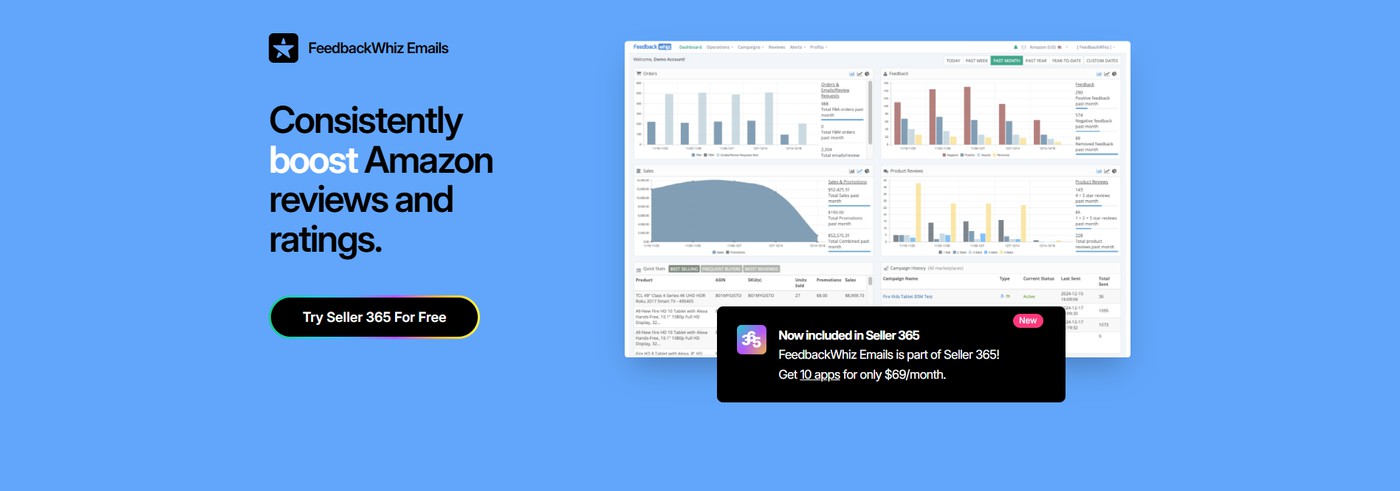
FeedbackWhiz helps you stay consistent with compliant outreach and monitoring, while Seller 365 bundles that with the rest of the tools sellers typically juggle across multiple subscriptions.
Features:
- Email automation — create compliant email campaigns once, then automate follow-ups that help drive more reviews over time.
- Review and feedback monitoring — track incoming Amazon reviews and seller feedback so you can spot issues early and protect your brand’s reputation.
- Profit analytics — analyze profits to make data-based decisions with clear performance visibility.
- All-in-one suite — Seller 365 also bundles sourcing support, inventory management, listing and FBA prep, repricing, and accounting, so sellers can manage more of their workflow in one package.
Teams like the “set it and forget it” setup for review outreach, plus having operations tools included when it’s time to act.
Pricing: Free trial: available (14 days)
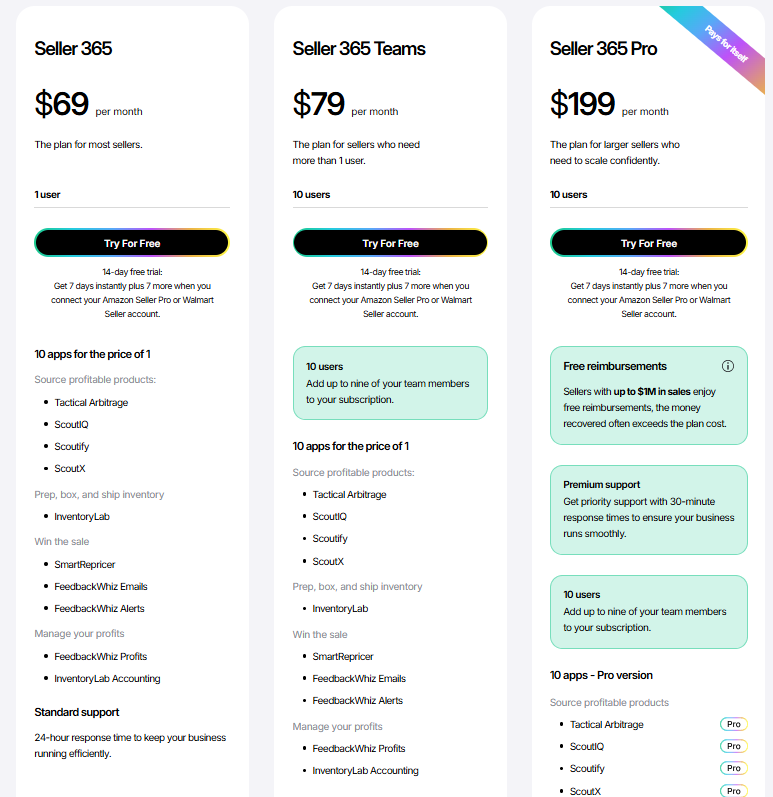
Plans: Seller 365 starts at $69/month and includes 10 apps in one subscription.
AppFollow, for the app store side of the same job
Free plan · 10-day trial on paid · pricing · verified Aug 2026
Honest placement first, because you’ll spot it anyway. AppFollow is not an Amazon marketplace tool. It won’t fire a Request a Review on an ASIN, it has no view of your seller feedback score, and if Amazon is the only place you sell, one of the nine tools above is the right answer. We’d rather say that here than sell you a subscription you’ll cancel in week three.
It’s on this list because a large share of Amazon sellers also ship an app or a game, and the review problem on that side is the same problem in different clothes.

Where it does touch Amazon: the Amazon Appstore is one of the stores AppFollow tracks, so you can watch metadata changes and category rankings for a listing there. Reviews and ratings on the Amazon Appstore are a harder story, and we’d rather be straight about it. Amazon’s restrictions on automated access mean review and rating parsing there is currently unstable, and that’s written into our own help docs, not buried in a footnote. If a vendor sells you Amazon Appstore review monitoring as a solved problem in 2026, ask them to show you a live feed before you sign.
What the tool actually does well is the part no first-party console does at all. Feedback Manager hands you a star rating and a list of comments. It won’t tell you that a third of last month’s comments are about one checkout bug.
That grouping is the job: AppFollow pulls reviews across the App Store, Google Play, the Mac App Store, Microsoft Store, Samsung Galaxy Store, HUAWEI AppGallery, Steam and Trustpilot, auto-tags them by topic and sentiment, and lets you answer from one screen with replies pushed straight back to App Store Connect and Google Play Console. Reviews route into Zendesk, Salesforce, Helpshift, Intercom or Slack, which is how a support team handles volume without living in four consoles.
If you want the mechanics of that, our guide to review management software walks the workflow, and customer sentiment analysis covers the tagging side.
Best fit: you’re running an Amazon business and an app, and you want the store-review workload handled with the same rigour you’re applying to seller feedback.
Less suitable when: Amazon marketplace is your only channel. Go back to table 1 and pick the row that matches your order volume.
cta_free_trial_purple
FedbackExpress — User Review Tool for Sellers
Picture this: an unfailingly polite helper who reminds every customer to leave a few kind words and keeps your star count looking shiny. That’s FeedbackExpress. Tucked inside the wider eDesk family, this bit of Amazon review management software helps rookie sellers and mega-stores alike look wildly organised.

FeedbackExpress UI in action. Image source.
Inside the toolkit:
- Multilingual templates – so your “gracias” lands just as smoothly as your “merci.”
- Timed replies – schedule follow-ups to pop in right after the delivery hugs arrive.
- Auto-data magic – order IDs, logos, product pics… already stuffed into each message.
- One-tap “flag & nudge” – spot a sketchy review, click once, and Amazon gets the memo.
- Set-and-forget email flows – nurture buyers without sacrificing your Sunday.
- Clear dashboards – trends, spikes, and hidden-gem feedback, all in plain sight.
- Snappy surveys – grab extra intel when stars alone don’t spill the tea.
The interface feels more like chatting with a mate than mastering flight controls. New sellers ramp up fast; high-volume shops finally breathe between pings. In other words, it’s a brain-space saver — scale without the firefighting.
Need Amazon feedback software that drops straight into your current routine? FeedbackExpress slots in neatly.
Pricing

Free trial: 14 days — plenty of time to see if those stars start twinkling brighter.
Plans: €109 – €359/month. Higher tiers = bigger email limits and more support channels.
FeedbackExpress is the always-awake concierge for your store’s reputation — minus the late-night caffeine shakes. ????
xSellco Feedback Amazon Review Management Software
This piece of Amazon feedback management software turns review mayhem into something you can handle in a single coffee break — even if you’re selling in half a dozen Amazon marketplaces at once.

xSellco’s Feedback dashboard feature screenshot — courtesy of eDesk Help Center. Image source.
Why it feels a bit like having cheat-codes:
- More marketplaces, no sneaky fees – spin up additional regions without paying an “expansion tax.”
- Plug-and-play integrations – eBay, Trustpilot, and friends all feed into one neat dashboard.
- A/B email testing – run two subject lines, keep the one that wins. Simple.
- Smart sending windows – queue messages to land right after the parcel’s on the doorstep.
- Instant alerts – get a gentle nudge the second a 1-star review appears, so you can jump in fast.
The dashboard feels more like WhatsApp than a flight deck, so even first-time Amazon sellers find their way around in minutes. Once it’s in your workflow, this Amazon feedback tool shaves hours off the repetitive stuff — bulk follow-ups, promo sequences, all that jazz.
Running several brands? xSellco turns into a mini command center for Amazon product review management, keeping ratings tidy and every customer answered, no matter how many storefronts you juggle.
Pricing

Free trial: 14 days. Kick the tires, no strings.
Paid plans: €39 – €154 per month (annual billing). Pricier tiers unlock heavier automation, more support channels, and bigger email limits — perfect once orders start snowballing.
xSellco Feedback is the polite, never-sleeping assistant who sends thank-you notes on time and taps you on the shoulder before any customer meltdown hits Twitter. ????
Feedback Genius Amazon Review Tool
Picture you’re juggling FBA restocks, ad bids, and — boom — another customer ping pops up. Feedback Genius (part of SellerLabs) steps in like a well-trained assistant, automating the back-and-forth so you can breathe.
This bit of Amazon feedback software lets you drop images, PDFs, even a snazzy signature into every follow-up, which quietly lifts conversion rates without you hovering over “Send.”
What’s in the toolkit:
- Email automation Schedule perfectly timed nudges using flexible templates.
- Review + feedback requests Ask for product love (or constructive truth bombs) in one click.
- Custom notifications Get a heads-up the second a shopper leaves a comment worth your attention.
- A/B email testing Run two subject lines, crown a winner, repeat.

An example of Feedback Genius’s template gallery, courtesy of SellerLabs PRO Walkthrough on Youtube.
Users love how this feedback software for Amazon trims hours off repetitive outreach. Yes, the interface could use a makeover, but most sellers agree the automation juice is worth the squeeze — especially when ratings and response times both climb.
Pricing
Free trial: 30 days — plenty of runway to see if it moves the review needle.

Tiered plans start at $49/month (annual billing) and scale up to $799/month as your 3P sales climb. Go big and you’ll unlock extra support channels — and even a dedicated account manager on the Enterprise tier.
If you’re hunting for the best Amazon feedback software to keep customer comms humming while you focus on growth, Feedback Genius deserves a test-drive. ????
Jungle Scout — Amazon Feedback Software
Jungle Scout is more than just Amazon product review software, it blends smart automations with pro tips, so you’re not only chasing five-star feedback — you’re scaling an entire FBA empire.

Jungle Scout’s interface, courtesy of Jungle Scout’s product tour
Why sellers keep it pinned in their bookmarks
- Email campaigns on autopilot – schedule, customize, and let the love notes fly while you sleep.
- A/B test those emails – pit two subject lines against each other and let the winner earn its keep.
- At-a-glance dashboards – clean stats to see what’s humming (and what needs a tweak).
- Keyword generator – surface phrases buyers actually type, then watch your visibility climb.
- Competitor snapshots – spy the market, stay three steps ahead.
- Supplier search – hunt reliable manufacturers without falling into Alibaba rabbit holes.
- Chrome extension – instant data while you scroll listings — no extra tabs, no fuss.
Customers rave about the slick interface, the punchy Amazon review management tools, and the quick-draw support team that actually knows FBA inside out. It’s like having a growth hacker in your back pocket.
Pricing:

No free trial, but every plan carries a 7-day, “no-questions-asked” money-back promise.
Tiers from $49 to $399/month. Higher plans unlock beefier automation, bigger limits, and extra user seats for your growing squad.
Jungle Scout isn’t just another Amazon feedback tool — it’s the co-pilot that helps you nab better reviews, smarter keywords, and bigger wins without burning out.
BQool Feedback Central Tools for Amazon Product Reviews

If answering reviews and chasing feedback has you ready to frisbee your laptop out the window, let me introduce BQool Feedback Central. This clever slice of Amazon product review software runs on just-enough AI to keep your inbox calm and your pulse steady.
Why it’s smarter than it looks:
- Automatic “thanks” and fixes – the bot replies while you enjoy an actual hot latte.
- Hands-free feedback nudges – shoppers get a gentle prompt without you lifting a finger.
- Dashboards that speak human – quick glance, know what’s winning and what’s wobbling.
- One-and-done templates – set rules for FBA and FBM orders once, then forget about them.
- Delivery-timed messages – emails land when the parcel does (chef’s-kiss timing).
- Searchable email history – need that convo from last month? Two clicks, found.
- Built-in VAT invoices – perfect if you ship to the EU and hate extra paperwork.
Sellers love the clean interface and lightning-fast support, making it a favourite for straightforward Amazon review management without the drama.
Pricing

Free trial: 14 days – plenty of time to watch a few five-star wins roll in.
Plans: $50 to $500 per month (billed annually). Higher tiers mean more emails, ASINs, and channels as your store gets busy.
BQool Feedback Central is that tireless teammate who tackles feedback, dishes up smart tips, and quietly boosts your star rating — so you can get back to growing the business instead of firefighting your inbox.
Sellics — Comprehensive Feedback Management Tool

Sellics is an all-in-one lifesaver. It keeps an eye on every review, gives you a nudge when something spicy pops up, and even tweaks your ads — all from one super-tidy dashboard.
Why I swear by it
- Ping-me-now review alerts – the second a shopper drops a comment, you’re there with a quick “Thanks!” before it snowballs.
- Set-and-forget email nudges – gentle follow-ups that stack five-star love while you sleep.
- Keyword rank tracker – see where you stand (and climb) without playing refresh roulette.
- One-glance cockpit – sales, stock, reviews… everything in one view, no spreadsheet gymnastics.
- PPC autopilot – wring more ROI from ads while your competition is still copy-pasting.
Sellers rave about Sellics’ clean layout and how smoothly its Amazon feedback management tools slide into their day — less admin, more five-star confetti.
Pricing

14-day free test drive — plenty of time to watch your ratings inch upward. Plans start at $49/month; higher tiers unlock deeper data and VIP support once your store hits sprint speed.
Sellics is that mini growth hacker in your pocket — fielding reviews, boosting keywords, and polishing ads — so you can dream up the next bestseller (and maybe enjoy a real lunch break).
AMZFinder — Review and Feedback Automation Tool

If replying to reviews all day has your wrists begging for mercy, hand the job to AMZFinder. This neat little Amazon feedback tool turns follow-ups into a “set-it-and-forget-it” routine, so your overcrowded inbox finally chills out.
Why it earns a browser bookmark:
- Auto-emails that feel personal – drop your order details into ready-made templates and send thank-yous in seconds.
- “Uh-oh” alerts for bad reviews – get a nudge the moment someone vents, so you can fix things before they snowball.
- ASIN-level focus – jump straight to the product that needs love and protect those star averages.
- Multilingual templates – talk to buyers in their own language without opening Google Translate.
- Automatic VAT invoices – EU customers get the right paperwork, you skip the spreadsheet grind.
People rave about how simple AMZFinder is: bulk automation, no fluff, just faster feedback and happier shoppers.
Pricing:

Free trial: 30 days — plenty of time to see your review stress shrink. Paid plans: start at $19/month; higher tiers lift your email limits and add extra support for growing stores.
AMZFinder is the dependable buddy who sends polite thank-you notes, spots trouble early, and frees you up to grow your Amazon business — no midnight caffeine required.
Helium 10 Amazon Product Review Software

Imagine one dashboard that polishes your reviews, hunts new keywords, and keeps tabs on that competitor who keeps copy-cating your listing photos. That’s Helium 10. This slice of Amazon product review software mixes friendly automations with wicked-smart data, so you spend less time clicking around and more time watching orders roll in.
Features:
- Review radar — the instant a shopper leaves feedback, Helium 10 pings you. Cue a quick high-five for the happy campers or a calm fix-it note for the grumblers.
- Follow-up on autopilot — write a short email sequence once; the tool nudges buyers for reviews while you snooze.
- Keyword wizardry — dig up high-intent phrases, drop them into your listing, and track your rank like a proud stage mom.
- Competitor X-ray — peek at rival reviews, spot the gaps, and slide your product into that sweet, unclaimed space.
- Inventory & price alerts — real-time “heads-up” when stock dips or a price war brews, so nothing blindsides you at checkout.
Sellers rave about the deep data insights and “set-it-and-forget-it” vibe — everything from Amazon review management to PPC tweaks just… flows.
Pricing

Free plan: dip a toe without dropping a dime.
Paid tiers: start at $29/month and scale up if you need PPC tools, advanced inventory tracking, or extra seats for that growing team.
Helium 10 is the Swiss-army sidekick that keeps your reviews shining, your keywords climbing, and your Amazon game one step ahead — without the 3 a.m. caffeine crash.
Which Amazon review tool you actually need
Mini-intro to sit above it:
Nine paid tools and four free Amazon ones is a lot to read through. Start here, then read the entry for whichever row matches you. Prices were checked against each vendor in August 2026.
If you need… | Start with | What to verify before you pay |
|---|---|---|
Review requests at low volume | Amazon’s Request a Review, free | Nothing. It’s free and it’s Amazon’s own wording. |
Automated requests at scale | FeedbackFive, from $34/mo | That it uses the Solicitations API, not custom messaging |
Requests plus profit analytics | Seller 365, $69/mo (includes FeedbackWhiz) | Which of the 10 bundled apps you’ll actually open |
Multi-channel support plus feedback | eDesk Feedback, from $39/agent/mo | Whether Feedback is included on your tier or an add-on |
Cheapest paid entry | BQool BigCentral, $10/mo | Email and ASIN limits on the Basic tier |
Reviews plus keyword and PPC data | Helium 10, from $99/mo annual | That the $39 Starter plan is gone as of April 2026 |
Seller feedback specifically | Amazon Feedback Manager, free | Whether you need product reviews too. Different object. |
Reviews on an app you also publish | AppFollow, free plan, 10-day trial | That you mean app store reviews, not Amazon product reviews. Different object again. |
cta_free_trial_yellow
FAQs On Amazon Review Tools
What are Amazon review tools, and why should I use them?
Think of them as your backstage crew. They scoop up every review, fire off polite “Hey, mind sharing feedback?” emails, and hand you a tidy dashboard that shows whether shoppers are cheering or side-eyeing your listing. Less spreadsheet chaos, more insight — and happier customers.
Can Amazon review tools improve my product’s ranking?
Indirectly, yes. More fresh, positive reviews + faster replies = higher star ratings. Amazon’s algorithm loves that combo, so your product nudges up the search results without you breaking a sweat.
Are Amazon review tools compliant with Amazon’s policies?
The good ones are. Stick to tools that follow Amazon’s rulebook — no gift cards, no “leave us five stars and we’ll love you forever” tricks. Keep requests neutral and you’ll stay on the nice list.
Can I use Amazon review tools to respond to negative reviews automatically?
You can. Most tools fire off a quick, polite first response. Pro tip: follow up personally once you’ve read the review. A human touch turns a frown into a fan faster than any canned reply.
Do Amazon review tools help with managing reviews across multiple marketplaces?
Absolutely. Platforms like FeedbackFive or xSellco pull comments from Amazon US, UK, EU — wherever you sell — into one dashboard. No more hopping between accounts at 2 a.m.
What types of automation do Amazon review tools offer?
- Automated “thanks for buying — mind leaving a review?” emails
- Instant pings the moment new feedback lands
- Auto-tagging to sort reviews by keywords or star rating
Automation = fewer mind-numbing tasks and more time for strategy.
How much do Amazon review tools typically cost?
Expect entry plans around $30–$50/month. Need heavier features — bulk emails, deeper analytics, multiple marketplaces? Budget $100–$500/month. Most tools offer a free trial, so you can kick the tires first.
What are some popular Amazon review tools?
- FeedbackFive – high-volume email blasts & sharp monitoring.
- xSellco – super-clean interface with smart automations.
- AppFollow – perfect if you juggle app reviews alongside Amazon feedback.
- Jungle Scout – blends review management with keyword and product-research muscle.
Line them up with your goals, take the free trials for a spin, and pick the one that feels like it “gets” your business.
Read also:
How to Read App Ranking Analytics and Find Growth Gaps
Crack App Analytics: Expert Guide to Win the App Store Game in 2025
Guide to App Store Analytics: Find the Data, Follow the Clues, Grow
Online Review Management Reputation Software: 15 Tools Review
Mastering Reputation Management: Strategies, Tools, and Insights to Boost Your Brand